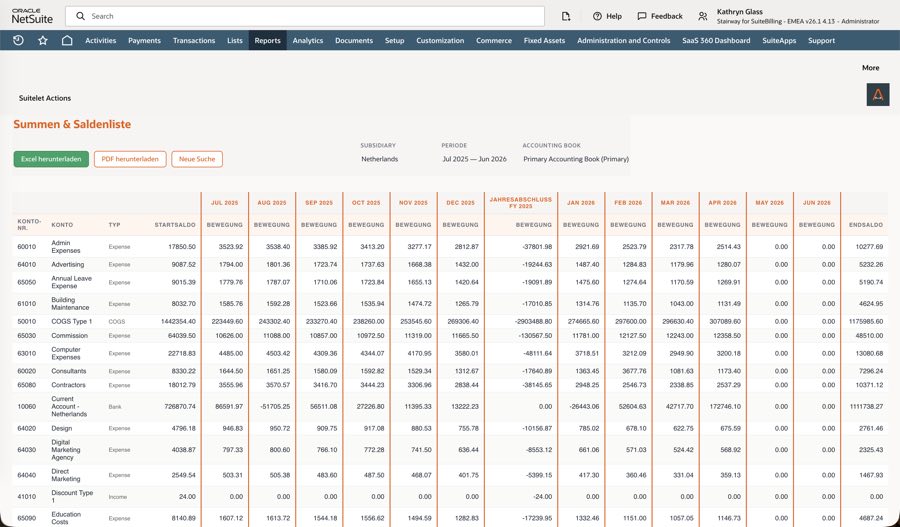
Plug-in · Trial Balance

A trial balance that adds up across fiscal years.

NetSuite's native trial balance covers the basics. But as soon as a German subsidiary, a deviating fiscal year or a cross-year query is involved, the decisive parts are missing: fiscal year segmentation, the carry-forward into retained earnings, separate debit and credit columns — and an export that arrives even at millions of rows.

Periods or free date range Multi-subsidiary · multi-book Excel including line items Local GAAP despite a US setup
Trial balance · Jan 1 – Dec 31, 2025 · DE subsidiary · primary book
Account Name Balance
0027 Software 128,400.00 Dr
1200 Bank 486,204.11 Dr
1600 Accounts payable 214,905.37 Cr
2970 Retained earnings brought forward 903,118.64 Cr
4400 Revenue, 19 % VAT 2,980,114.52 Cr
IN BALANCE Total debit equals total credit. Last year's P&L accounts are reset to zero at year end and the result sits in retained earnings — without a single closing entry in NetSuite.
Why

The native trial balance stops at the fiscal year boundary.

For a US setup, NetSuite's trial balance is coherent. In a German statutory close, what it does not do stands out — and it stands out to the very people you send the list to: accountants, auditors, group finance.

The year end is ignored

Query several years and the P&L accounts simply keep running. The list shows three years of revenue in one line — you cannot derive a balance sheet from that.

No carry-forward without a close

The result only reaches retained earnings once NetSuite has actually been closed. Until then it is missing — and the balance sheet does not balance.

Fiscal year ≠ calendar year

A 4-4-5 calendar or a November-to-October fiscal year: if the fiscal year differs from the subsidiary's reporting year, the native report cuts in the wrong place.

Debit and credit merged

A proper trial balance lives on both columns. Show the net balance only and you drop exactly the movement the auditor wants to see.

Exports break on volume

Large accounts, long periods, many subsidiaries: reports run into timeouts instead of finishing — and you cannot even be sure the result was complete.

Open periods stay invisible

If a period is not closed yet, later postings can change today's numbers. Without a note on the report nobody notices — until the figures drift apart.

Our answer

Three mechanics that save the close.

The trial balance performs the statutory year end itself — in the report, not in the general ledger. Your NetSuite stays untouched: nothing is posted, nothing reconfigured, nothing back-dated.

Automatic fiscal year segmentation

For cross-year queries the P&L accounts are reset to zero at each fiscal year end and the annual result moves into retained earnings — separately for every year in the range.

Fiscal year override

The FY start date is a parameter — November 1 for a November-to-October fiscal year, for instance, no matter how the NetSuite calendar is configured.

Virtual historical close

Historical profits and losses are moved into retained earnings virtually. The balance sheet balances even if a closing entry was never made in NetSuite.

Query Nov 1, 2022 – Oct 31, 2025 · FY start Nov 1
FY 2023 P&L accounts zeroed at Oct 31, 2023, result carried forward segmented
FY 2024 P&L accounts zeroed at Oct 31, 2024, result carried forward segmented
FY 2025 current year — P&L accounts with their actual balances open
NO INTERVENTION All of this happens inside the report. Not a single posting is created in NetSuite.
The result

What's inside the file.

One Excel file, three sheets — the overview for the close, the line items for every follow-up question, and the control totals so nobody has to recalculate whether the list is complete.

trial_balance_2025_DE_primary.xlsx
Sheet “Trial balance” Account, name, debit and credit per period, balance — separate columns or net overview
Sheet “Line items” Every posting behind the balances, with document, date, period and subsidiary evidence
Sheet “Totals” Control totals for debit and credit including the difference — the proof control
Header Range, subsidiary, accounting book, creation time and the note on open periods context
READY TO SEND The file goes to your accountant as it is — no rework, no explanatory email alongside.
How it runs

Four steps to the finished list.

1

Set the filters

Posting periods or a free date range, subsidiary, accounting book, debit/credit split or net — all on one screen.

2

Run the calculation

Small queries return immediately. At high volume a background process takes over instead of letting you run into a timeout.

3

Wait for the notification

If the report runs in the background, an email arrives with a direct link to the result — you do not have to keep the page open.

4

Pass the file on

The file sits in the NetSuite file cabinet and can be handed on unchanged — to accountants, auditors or group finance.

Large clients

Millions of postings are the normal case, not the exception.

SuiteQL instead of saved searches

Balances come from direct SQL queries against the ledger — no saved search that quietly stops at 4,000 results.

Map/Reduce in the background

Beyond a certain volume NetSuite splits the work into packages itself. Each package gets a fresh governance budget — the report finishes.

No silent truncation

Either you get the complete file including control totals, or you get a clear message. There is no half result that looks like a whole one.

Feature set

What else the list does.

Period or date search

Filter by posting periods or set a free start and end date.

Separate debit and credit

Either dedicated debit/credit columns per period or the compact net presentation.

Multi-subsidiary

Full support for multi-subsidiary structures — per entity or consolidated.

Multi-book

One report per accounting book — local GAAP and IFRS side by side, without mixing the books.

Open period warnings

If a period is not closed yet, it says so on the report — not just in the back of your mind.

Line items per balance

Every posting that makes up an account balance — the auditor's follow-up is answered in advance.

Asynchronous export

Large runs in the background, with an email and a direct link to the result.

Configurable per deployment

Default subsidiary, accounting book, fiscal year override and target folder are script parameters.

Stays in your account

The data never leaves NetSuite. No external service, no copy anywhere.

Who it's for

Built for closings that somebody reviews.

The trial balance is made for CFOs, controllers and accountants in NetSuite accounts with German, Austrian or Swiss entities — especially where the setup was originally geared towards US GAAP or a 4-4-5 calendar and the local close still has to be right.

The honest test: query a range that crosses a fiscal year end and send both to your accountant — the native trial balance and this one. The difference explains itself.
Technical facts

What your IT wants to know up front.

Technology

SuiteScript 2.1 and SuiteQL — direct queries against the ledger, no saved searches.

Large volumes

Map/Reduce takes over automatically at high volume — no timeout, no partial result.

Delivery

SuiteBundle 595828 — installation and updates through NetSuite's bundle mechanism.

Parameters

Default subsidiary, accounting book, fiscal year override and export folder are set per deployment.

Output

An Excel file in the file cabinet with trial balance, line items and totals sheet.

Data residency

Everything stays in the account — no external service, no data replication.

FAQ

Frequent questions

Why doesn't my balance sheet add up across a year end?

Because in the native report the P&L accounts simply keep running. Under German GAAP they have to be reset to zero at fiscal year end and the result has to move into retained earnings. That is exactly what this report does — for every year in the range.

Do we have to post the year-end close in NetSuite for this?

No. The carry-forward happens virtually inside the report. No posting is created in your ledger, nothing is closed and nothing is changed.

Our fiscal year differs from the calendar year — or we use 4-4-5.

Then you set the FY start date as a parameter, for example November 1. Segmentation follows your statutory fiscal year regardless of how the NetSuite calendar is configured.

How large can a query be?

Large. Balances come from SuiteQL, and at high volume the calculation automatically runs as a Map/Reduce job in the background. You get an email with a direct link once the file is ready.

What happens if a period is still open?

The report tells you. Open periods are flagged so it is clear that later postings can still change these numbers.

Can we report local GAAP and IFRS side by side?

Yes. The report runs per accounting book. You produce the list once for one book and once for the other — the books are never mixed.

How does the accountant get the file?

As an ordinary Excel file from the file cabinet — hand it over or link it. The line items are in the same document, so follow-up questions don't turn into another request to you.

Next step

See the list on your own numbers.

We produce a trial balance for a range of your choice — ideally one that crosses a fiscal year end — and you check with your accountant whether it shows what they expect.