Plug-in · German VAT & ELSTER

The VAT return should come from your postings. Not from a spreadsheet.

Between the tax lines in NetSuite and the form in “Mein ELSTER” most companies keep a spreadsheet, a routine, and one person who knows which tax code maps to which official key figure. That works — until the deadline gets tight, a new tax code appears, or somebody asks where line 81 actually came from. This plug-in moves the whole path, from posting to tax office, into the system where the numbers are made.

Suitable for use withELSTER®
Key figures per official form USt 1 A Validated with the ELSTER library ERiC Runs inside your NetSuite account Drill-down to the single transaction
Fourangle UStVA
€100per
month
Subscribe
Manage subscription
VAT return · Muster GmbH · July 2026 · accrual basis
Line 81 Taxable supplies at 19 % 1,284,902.00
Line 86 Taxable supplies at 7 % 64,115.00
Line 41 Intra-Community supplies 318,740.00
Line 89 Intra-Community acquisitions at 19 % 96,400.00
Line 66 Input VAT from invoices 172,408.44
Line 83 VAT payable for the period 79,104.82
VALIDATED Checked by the official ERiC library without objection. Every key figure opens down to the individual posting.
Where it goes wrong in practice

The numbers are usually right. The route to them is the problem.

NetSuite holds every tax line the return needs. What is missing is the last mile: mapping onto the official key figures, validating before filing, and keeping evidence of what was reported when. Almost everywhere that mile is walked by hand — every month, against a deadline.

Retyping is not a process

Moving figures from a report into a portal form has no second pair of eyes, no validation and no trail. A transposed digit surfaces when the tax office asks, not before.

The mapping lives in someone's head

Which tax code belongs to which key figure is usually known by exactly one person. Add a new code, or lose that person for a week, and the filing waits for an answer.

Reverse charge and intra-Community cases

§ 13b and intra-Community acquisitions hit several key figures at once — base and tax, output and input side. That is precisely where the differences appear that are painful to explain later.

No way back to the evidence

A filed return offers no route back to the documents behind it. When the auditor asks about line 66, a reconstruction starts instead of an answer.

Late postings in a reported period

A correction in last month's data is not noticed by itself. Whether an amended return is due stays a matter of experience — until the tax office raises the question.

The deadline does not negotiate

The 10th comes every month. If filing depends on one colleague being at their desk or on a portal login that still works, that is no longer a technical question but one with a late-payment penalty attached.

Our answer

One cockpit in your account — from preview to transfer ticket.

Straight from the postings

Key figures are built from the tax lines of the selected period. No intermediate spreadsheet that can drift away from the books.

Mapping as a rule set, not as knowledge

Every tax code carries a stored key-figure rule. A setup wizard proposes a mapping for each active code and ships the common German standard mapping.

Officially validated before filing

The return is checked by the ELSTER library ERiC — the same plausibility rules the tax administration applies. Errors appear in plain language in the cockpit, not in a rejection notice.

Traceable to the document

Every key figure opens up: which transactions it contains, with which tax code, amount and date.

The run is the evidence

Each filing has a run record with a key-figure snapshot, the transaction list, the submitted data set and — after transmission — the transfer ticket and the official protocol.

No accidental second filing

After submission the included transactions are stamped with the run. The same period cannot be filed twice as an original return by mistake.

The route to the tax office

The official route — not a rebuilt one.

Filing goes through ERiC, the tax administration's own C library that also sits behind “Mein ELSTER” and the familiar German tax packages. Fourangle is a registered software producer with the tax administration, and the transmission route is evidenced by an official transfer protocol.

Registered producer

Producer ID 22797, issued by the Bavarian State Tax Office as the national coordinator of the ELSTER procedure. It travels in every data set we submit.

Official library, current version

Validation and filing use ERiC in the release approved by the tax administration. The mandatory updates — around three a year — are our job, not yours.

German server, stateless

The ERiC route runs on a dedicated machine in a German cloud. It validates and transmits — and keeps no copy of the return. The evidence stays in your NetSuite account.

Test first, then live

Every setup starts against the ELSTER test environment: same route, same checks, no effect at the tax office. Only once that works does anything go live.

Transfer ticket and protocol

After transmission the transfer ticket and the official protocol come back and attach to the run — the proof that the return arrived, and when.

A route that continues

The same route carries further ELSTER data types. The advance VAT return is the first step; the E-Bilanz is the next.

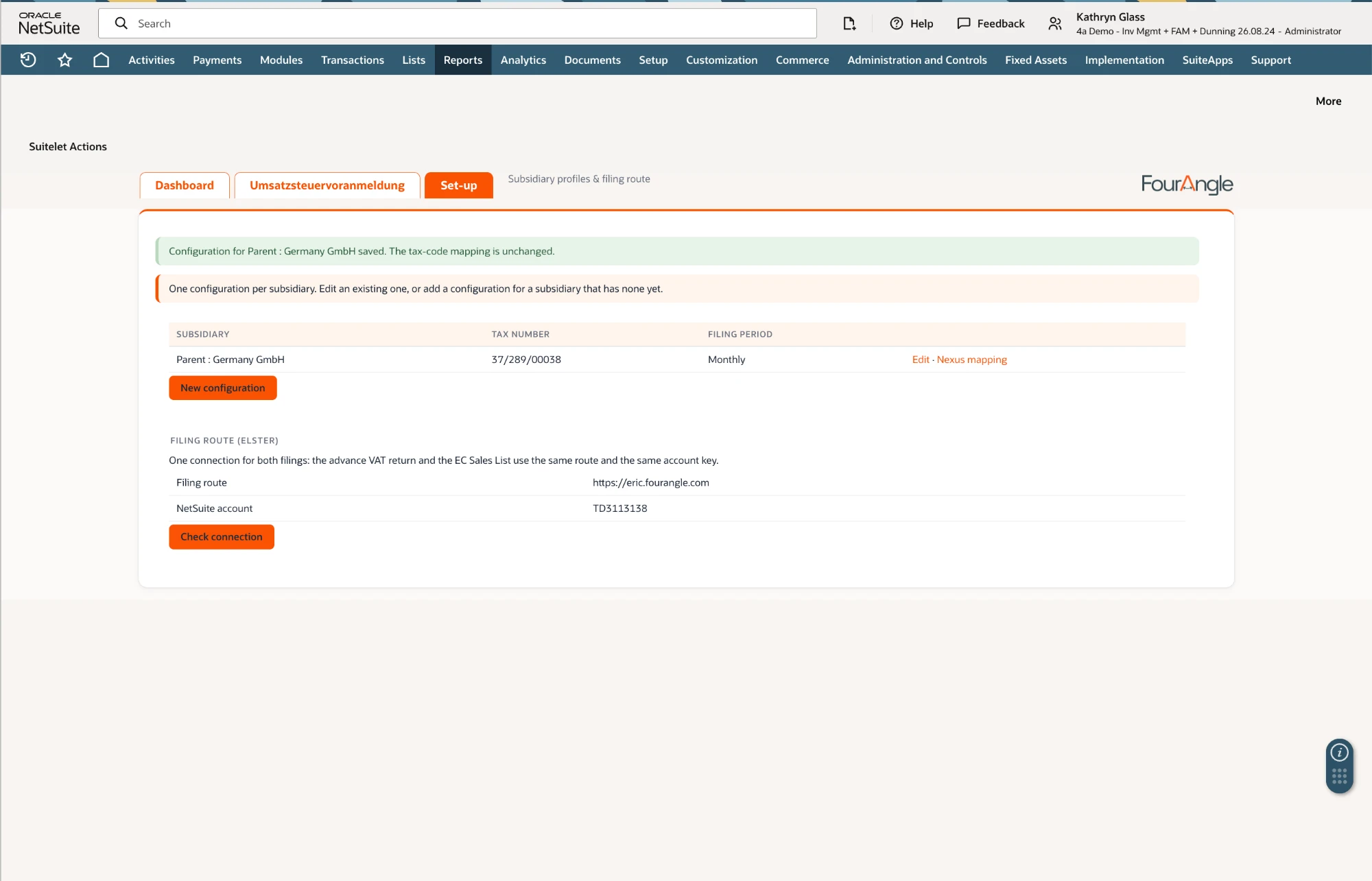
Setup is part of it. The route is built and evidenced against the ELSTER test environment, with transfer ticket and official protocol on file. What every company needs once is its own setup: tax number, key-figure mapping signed off by your tax adviser, and a test run — we do that together, before the first real period goes to the tax office.
Scope

What the plug-in brings.

VAT cockpit

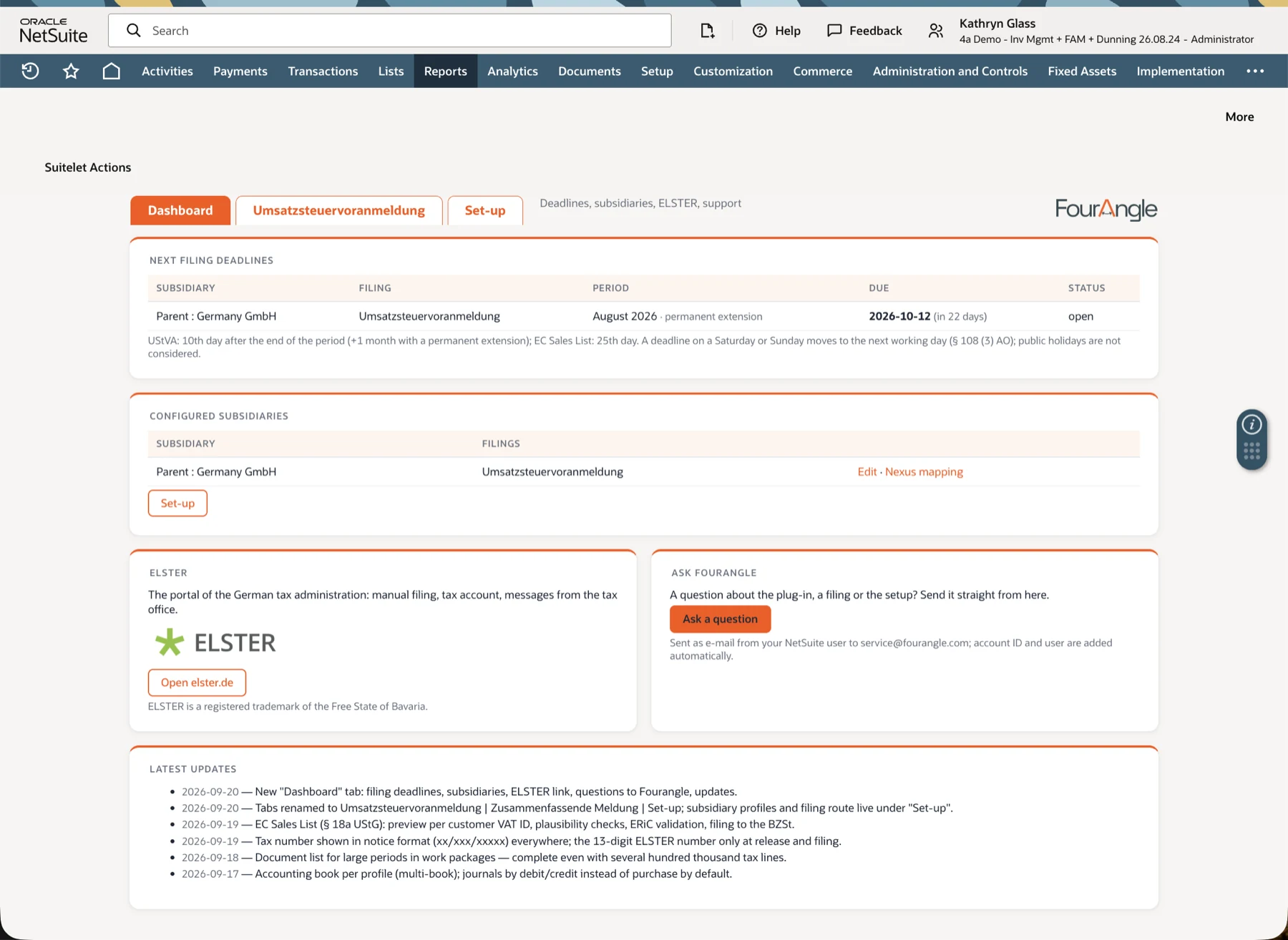
Its own page under Reports → VAT/GST: pick a period, compute the preview, validate, create the filing, submit — all in one place.

Setup wizard

Creates the configuration per subsidiary, checks the 13-digit ELSTER tax number and proposes a key figure for every active tax code.

German standard mapping

The common assignment of tax codes to key figures ships with the plug-in and can be applied in one click — as a starting point for your tax adviser's sign-off, not as a replacement for it.

Checks before ELSTER sees it

Unmapped tax codes are a blocker, not a footnote. Odd ratios between taxable base and tax are flagged before the return leaves the house.

Run record with attachments

Key-figure CSV for manual entry, transaction snapshot, submission payload and the validated ELSTER data set — all on the run, all findable later.

Several subsidiaries

One configuration per subsidiary, each with its own tax number and filing rhythm. The cockpit lets you choose which one is due.

The manual route stays open as long as you want it: take the values from the key-figure CSV, enter them in “Mein ELSTER” yourself and mark the run as filed manually. The audit trail inside the system is the same.
How it works

Four steps a month.

1

Compute the preview

Choose subsidiary, year and period. The cockpit shows every key figure in official order, the amount payable, and any warning that stands in the way of filing.

2

Have it officially validated

One click builds the ELSTER data set and hands it to ERiC. Green means formally valid. Red states, in plain language, what the tax office would object to.

3

Create the filing

Only after a passed validation is the run created — with snapshot and attachments. If the validation route is ever unreachable, the run is still created, with a clear warning: no deadline should fail because of infrastructure.

4

Submit

The validated data set goes encrypted to the receiving server. Transfer ticket and protocol land on the run, and the included transactions are stamped.

Data and responsibility

Who sees what — and what is kept.

The evidence stays with you

Runs, snapshots and protocols live in your NetSuite account. What leaves the house is the data set for the tax office — nothing else.

Transmission without a staging store

The ERiC machine processes the return in memory and answers with result, ticket and protocol. It files no copy.

Clear roles

Who may compute, who may create a filing and who may submit is governed by NetSuite roles. Submission is the narrowest permission, not the broadest.

FAQ

Frequently asked

Do we need NetSuite's Germany Localization?

No. The plug-in reads the tax lines in your account and brings its own key-figure logic and ELSTER route. If the localization is installed, it does no harm.

We run SuiteTax — does that work?

Data extraction is complete today for NetSuite's classic tax logic (legacy tax); the interface for SuiteTax is prepared but not yet shipped. Talk to us and we will tell you plainly where your account stands.

Does the standard mapping replace our tax adviser?

No, and that is deliberate. The shipped mapping is a reviewed starting point; which key figure is right for your company is your adviser's call. The cockpit makes the assignment visible so that sign-off is possible at all.

Who is the filing party towards the tax office?

We settle that explicitly during setup — technical transmission by Fourangle, or your own organisation certificate. Both are possible, but they carry different obligations under § 87d of the German Fiscal Code. We put it in writing before the first real data set moves.

What about cash-basis accounting and deadline extensions?

Both are on the roadmap but not included today. The shipped scope is the return on an accrual basis. We would rather say so now than during the project.

And if something is posted into a period we already reported?

Because every filing stamps its transactions and freezes the state as a snapshot, what has been added or changed since is visible. The amended-return workflow builds on exactly that and comes with the next step.

What does it cost, and what is in the subscription?

A monthly subscription per NetSuite production account, cancellable monthly. How many sandboxes to include is chosen at checkout, along with your NetSuite account ID so the licence is tied to the right account from the start. The one-off setup — configuration, mapping sign-off, test run — is billed separately, and we tell you the scope up front.

How is the plug-in installed?

As a NetSuite bundle in your account, plus an access key for the transmission route. We do the setup together in a short session; updates come through the same channel.

Is the E-Bilanz next?

That is the plan. The transmission route is built independently of the data type — the advance VAT return is the first use case, not the only intended one.

Get started

Let's walk one period through together.

We set the cockpit up in your account, go through the mapping with you and your tax adviser, and run a real period against the ELSTER test environment — before anything reaches the tax office.

Suitable for use withELSTER®