Plug-in · Income statement (HGB)

The income statement that belongs in the statutory accounts.

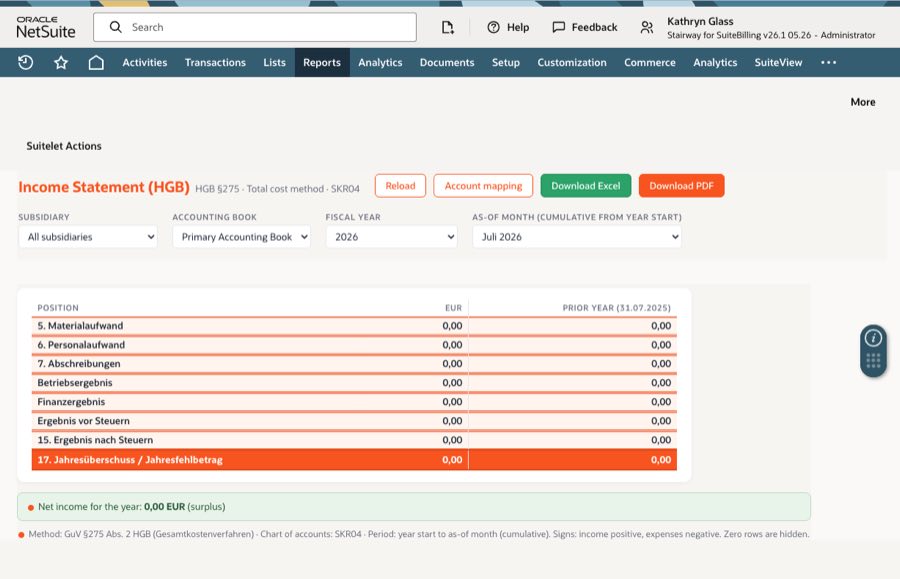
NetSuite has an income statement, but no statutory German structure. The Fourangle income statement produces the P&L by the cost-of-sales method under § 275 (3) HGB directly from the postings in your account — properly structured, with a prior-year column, in a form that tax advisors and auditors read without asking questions.

§ 275 (3) HGB · cost-of-sales method SKR03 · SKR04 · account type as fallback Prior-year comparison HTML · Excel · PDF
Fourangle Income Statement (HGB)
€6.95per
month
Subscribe
Manage subscription
Income statement · cost-of-sales method · FY 2025 · DE subsidiary · primary book
Revenue prior year 4,112,880 4,612,400
Cost of sales prior year 2,348,115 2,615,480
Gross profit on sales prior year 1,764,765 1,996,920
Selling expenses prior year 761,402 842,310
General administrative expenses prior year 486,310 512,905
Net income for the year prior year 402,118 486,302
AUDIT-READY Every position traces back to its accounts. Anything not assigned to a position is shown — instead of quietly disappearing into the result.
Why

An income statement is not a statutory P&L.

The amounts are right, the order is not. German statutory accounts require a specific sequence of positions — and the longer an account runs without an assignment, the later anybody notices that the report no longer matches what was posted.

No structure under § 275

NetSuite groups by account type, not by statutory positions. For the close, somebody has to create that mapping — so far usually in Excel.

The prior-year column is missing

German GAAP expects the prior year alongside. Placing it there by hand means comparing two reports produced at different points in time.

Amounts vanish quietly

In home-grown reports a new account without an assignment simply drops out. The result no longer matches the books — and nobody sees it.

Several books, several truths

HGB and IFRS side by side need the same report per book. Build a separate tool per view and you maintain two mappings.

The auditor wants to see the origin

A position without a traceable account basis creates questions. And questions during the close always cost more time than the report itself.

External tools mean copies of your data

A reporting tool alongside needs exports, reconciliation and maintenance. For a report built on the very same postings, that is a long detour.

Our answer

The mapping is there — and stays traceable.

Accounts are pulled onto the statutory positions automatically: through the number ranges of SKR03 or SKR04 and, where no chart of accounts is assigned, through the NetSuite account type. Anything that should differ you override on the individual account — once set, the override wins.

Mapping · accounts onto statutory positions · chart SKR04
Chart of accounts Assignment through the number ranges of SKR03 or SKR04 automatic
Account type as fallback Where no chart is assigned, the NetSuite account type applies fallback
Override per account Put individual accounts on a different position — maintained on the account itself manual
Not assigned Balances without a position stay visible — the proof that nothing is missing control
NO FOREIGN TABLES The mapping lives in NetSuite — no mapping file somebody has to maintain and pass around.
The report

At the push of a button, in the shape of the close.

By posting period

Month, quarter or fiscal year — the report follows your posting periods, not a separate calendar.

Per subsidiary and book

A fit for multi-subsidiary and multi-book structures: HGB and IFRS are reported separately, never mixed.

Prior-year column

As soon as prior-year figures exist they sit in their own column — from the same report, calculated in the same moment.

HTML, Excel and PDF

Read it on screen, keep calculating in Excel, hand the PDF to auditors or your tax firm — the same report in three shapes.

Also at volume

Built for substantial clients: the report finishes even when many periods and entities come together.

Straight from the postings

No export, no intermediate state: the P&L is built from your ledger the moment you open it.

How it runs

Three steps to the first statement.

1

Install

SuiteBundle 703926 is installed into your account like any other bundle. The account mapping is derived automatically from the chart of accounts or the account type.

2

Override the special cases

Accounts that belong elsewhere get their position on the account itself. Whatever stays open is shown in the report.

3

Report and export

Pick period, subsidiary and accounting book, open the statement, read it as HTML or pass it on as Excel or PDF.

The honest test: take your last audited accounts and run the same fiscal year here. If the positions match down to net income, the mapping is right — and the detour through Excel is over.
Feature set

What the statement does.

Cost-of-sales method

Structured under § 275 (3) HGB — the method that matches how NetSuite carries inventory.

Automatic account mapping

Via SKR03 or SKR04, with the NetSuite account type as fallback — no external mapping tables.

Account-level override

Assign individual accounts differently; the override wins over the automatic mapping.

Period reporting

By posting period, for a month, a quarter or a fiscal year.

Multi-subsidiary and multi-book

Per entity and per accounting book — a fit for group structures.

Prior-year comparison

Its own column as soon as prior-year figures are available.

Export HTML, Excel, PDF

Straight from NetSuite, reliable even with large data volumes.

Visible remainder row

Unassigned balances are shown instead of disappearing quietly.

Stays in your account

No data exports, no third-party systems, no manual rework.

Fits together

P&L and balance sheet from one source.

The income statement is the sibling of the balance sheet under § 266 HGB: same logic, same mapping, same data. Together with the trial balance and the management report, the German reporting set is complete inside NetSuite — with no Excel file holding the truth.

Who it's for

For everyone preparing German statutory accounts.

The statement is made for CFOs, accountants, controllers and tax advisors in companies that book in NetSuite and prepare statutory accounts for their German entity — particularly in groups whose NetSuite setup is geared towards US GAAP.

Technical facts

What your IT wants to know up front.

Technology

Native SuiteScript inside the account — the report reads the ledger directly.

Delivery

SuiteBundle 703926 — installation and updates through NetSuite’s bundle mechanism.

Mapping

SKR03 and SKR04 by number range, NetSuite account type as fallback, override per account.

Reporting levels

Posting period, subsidiary and accounting book.

Output

HTML on screen, Excel (XLSX) and PDF to pass on.

Data residency

Everything stays in the account — no external service, no copy.

FAQ

Frequent questions

How does the plug-in know which account belongs to which position?

From the chart of accounts: SKR03 and SKR04 have fixed number ranges. Where none is assigned, the NetSuite account type applies as a fallback. Both can be overridden per account.

Cost-of-sales or nature-of-expense method?

Cost of sales, § 275 (3) HGB. NetSuite posts production cost through inventory management per transaction, so the cost of the goods and services sold is already there — which is exactly what the cost-of-sales method builds on. The nature-of-expense method would only be possible without inventory management, and then the report loses its basis.

What happens to accounts that fit nowhere?

They do not disappear. Unassigned balances are shown, so the sum of the positions matches what was actually posted — and you see immediately where a mapping is still missing.

Do we get the prior-year comparison automatically?

Yes, as soon as prior-year figures exist. The column comes from the same report, so from the same data — not from an older file.

Can we report HGB and IFRS side by side?

Yes. The report runs per accounting book. You produce it once for one book and once for the other, without the books mixing.

Does it match the balance sheet from the same house?

Yes — both reports work on the same postings and use the same logic for mapping and overrides. The result for the year is therefore identical on both sides.

Do we have to export data or run another system?

No. The report runs inside your NetSuite account; the only thing that leaves is the finished file, if you create one.

How does the statement reach the tax advisor?

As a PDF or Excel file from NetSuite. Anyone who wants to check its origin gets the report together with the positions it is composed of.

Next step

See the statement on your own numbers.

We produce the income statement for a fiscal year of your choice — and you compare it with what your statutory accounts show today.

Fourangle Income Statement (HGB)
€6.95per
month
Subscribe
Manage subscription
Request a trial run All plug-ins